
For iPhone, iPad and Mac
Your library, in one photo.
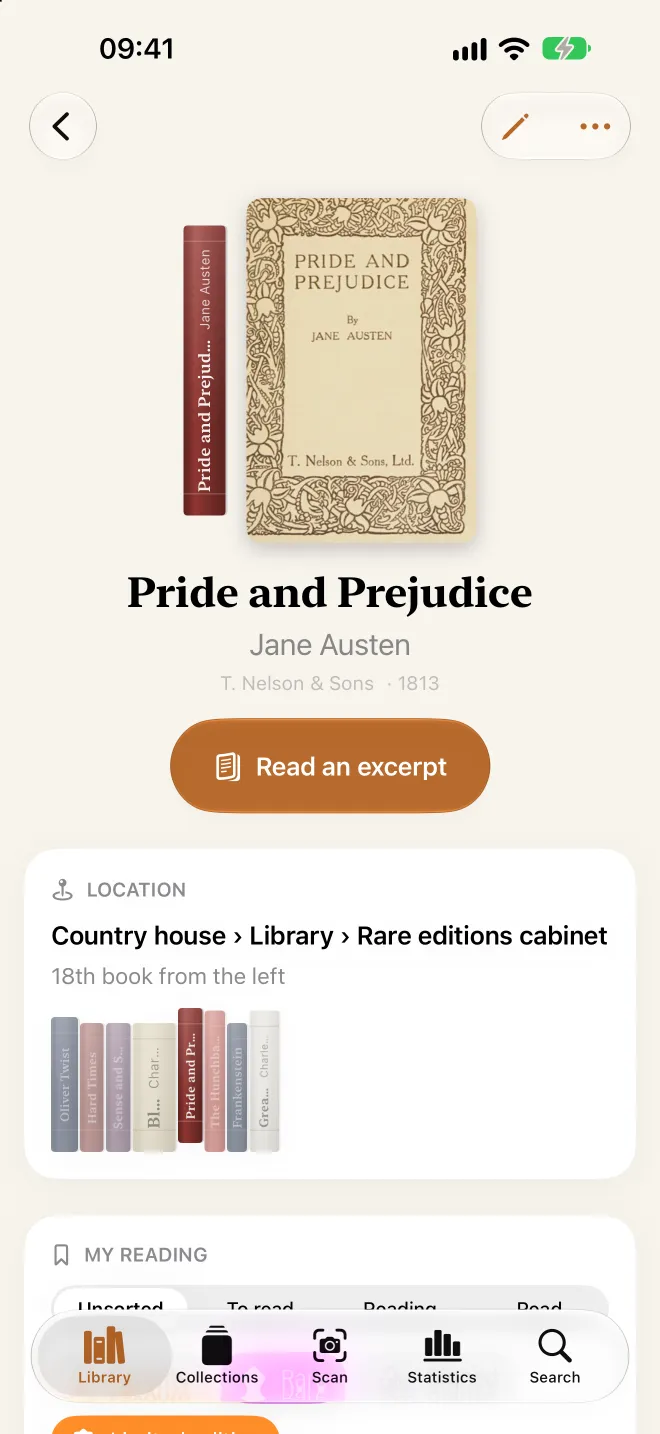
Photograph a shelf: Biblioscope reads the spines, finds every book in the great public catalogs and remembers exactly where it sits, down to the book.
Free · no subscription · no account
- Free, no subscription
- No account
- No ads, no tracking
- Photos analyzed on device
- Your private iCloud
- iPhone · iPad · Mac
Chapter I
Snap it, it’s shelved
One photo of the shelf and Biblioscope does the rest: it reads every spine on device, finds the book in the great public catalogs and files it in its exact place. Hundreds of books cataloged in minutes, without typing a thing.
-
1
Photograph
Stand facing the shelf, about three feet away, with every spine in the frame. One photo is enough; up to five for a long shelf.
-
2
Biblioscope reads
Spines are read on device, even tilted, worn or upside down, then each book is identified for free in public catalogs.
-
3
It’s shelved
Confirm with a tap. Every book remembers its place: home, room, bookcase, shelf and position, from left to right.
Read on device
Apple’s text recognition reads the spines right on your iPhone or iPad. Tilted or stacked books are straightened, upside-down spines flipped.
Free identification
Each book is looked up in the catalog of its language: the BnF for French, the Library of Congress for English, the National Library of Spain for Spanish, the National Diet Library for Japanese, and Open Library for the rest of the world.
ISBN barcode as a fallback
Spine unreadable? Turn the book over: your iPhone or iPad reads the ISBN on the back and finds the right edition.
Nothing added by chance
Uncertain books are set aside in “To review”. Apple Intelligence helps decide, on device, and you always have the final say.
Chapter II
Every book, in its place
Biblioscope rebuilds your library as it really is: your homes, rooms, bookcases and shelves, with every book in its real order, left to right. You always know where it is, and what sits next to it.
Your whole layout
Places, rooms, bookcases, shelves: as many homes, offices or storerooms as you like. Shelves can even be created while you scan.
The Floor plan
The entire library at a glance, like an architect’s drawing: each spine in its color, in real order. Tap a bookcase to open its books.
The Shelves
Your bookcases rebuilt spine by spine, with their color, height and thickness. Tap a book and it slides off the shelf.
On every book
Its full location and its shelf neighbors, so you find it on the first try.
1,438
books, each in its exact place
4 rooms · 9 bookcases · 38 shelves — and that’s just one home.
The Floor plan, in miniature
One stroke per book, in the color of its spine. Tap a bookcase to show its path and how many books it holds, just like in the app.
Home
4 rooms · 9 bookcases · 38 shelves · 1,438 books
Living room 540
Office 532
Bedroom 230
Hallway 136
Tap a bookcase to show its path.
Chapter III
See it your way
One library, five ways to browse it. Switch from spines to covers, from the floor plan to the list, depending on what you’re after.
The Shelves
Your bookcases rebuilt, row by row. Each spine keeps its color, height and thickness, with its title the right way up. Turn on “Photographed spines” to see the real ones.
The Floor plan
Your whole layout on one screen: places, rooms in dotted outlines, bookcases and boards, one stroke per book. Pinch to zoom; tap to open a place.
The Grid
Covers in a mosaic. They’re found automatically and kept on device, even offline; when there is none, a typographic cover is set for the book.
The Covers
A perspective flow, cover after cover, to wander through your library the way you would in a bookshop.
And the List, plain and fast, to run through everything at once.


On iPad and Mac
More room, more shelves
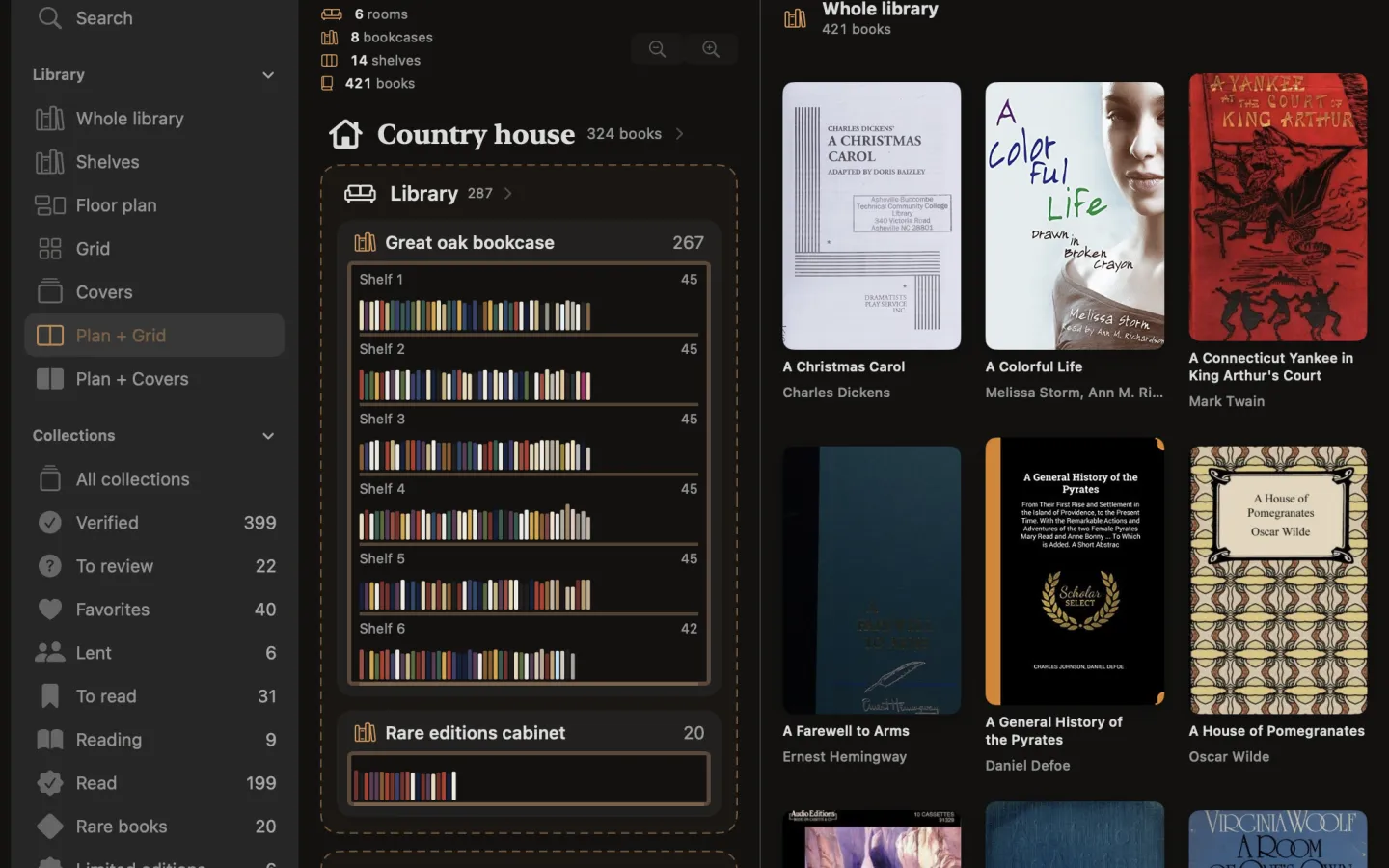
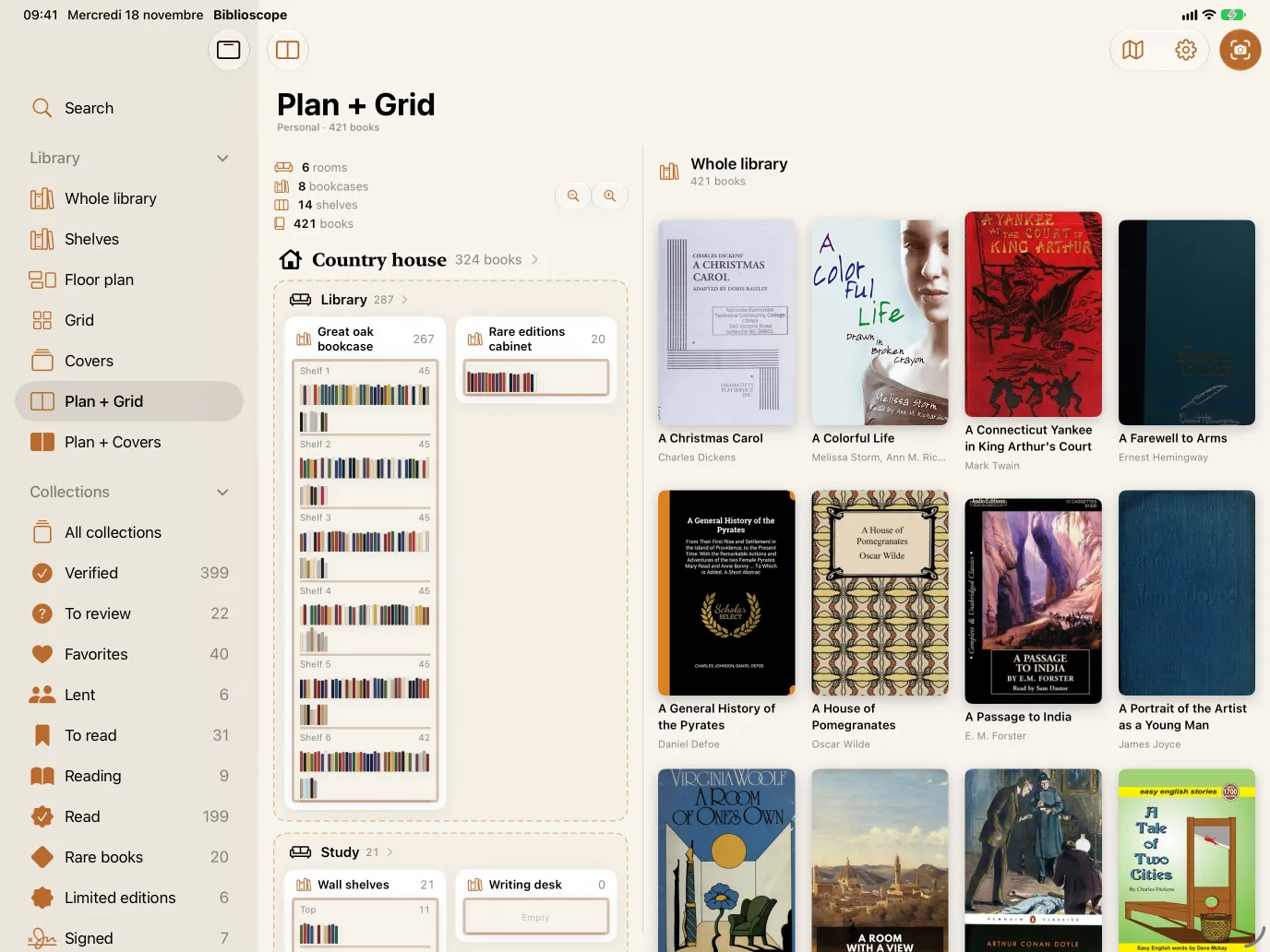
On iPad and Mac, Biblioscope opens up a full sidebar and combined views: the plan on one side, the books on the other. Tap a room or a bookcase and its books appear alongside.
- Sidebar: search, every view, collections, places and tools
- Plan + Grid, Plan + Covers, Plan + List
- On Mac, arrow keys to flip through covers
- The same library everywhere, through your private iCloud

Chapter IV
Find anything in a second
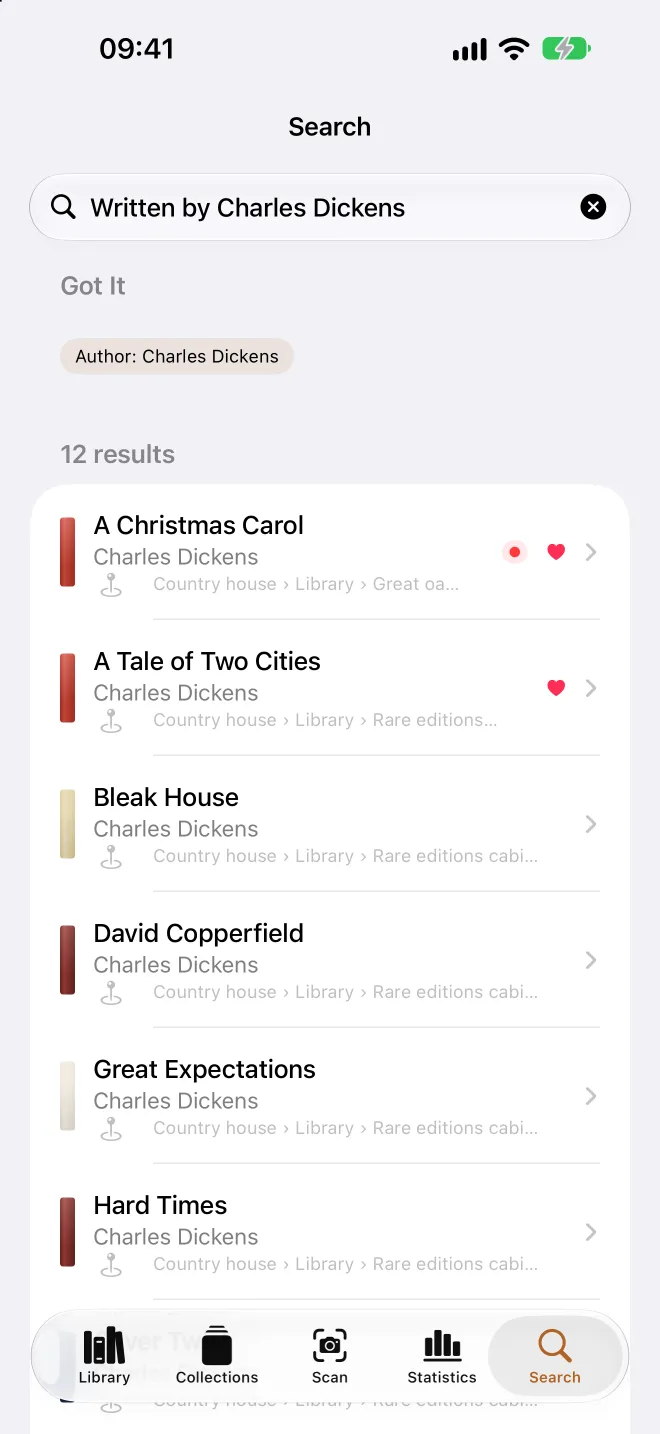
Type a title, an author, a publisher, an ISBN or a place: results appear as you type. Or simply ask, the way you would ask a bookseller.
- Color red
37 books
- The Scarlet Letter Nathaniel HawthorneLiving room › Large bookcase · shelf 3
- The Red Badge of Courage Stephen CraneOffice › Glazed bookcase · shelf 1
- Madame Bovary Gustave FlaubertBedroom › Bookcase · shelf 2
Try:
Instant search
Title, author, publisher, series, ISBN, location: the field is always there and results follow your typing.
Bookstores and libraries near you
The closest ones on a map, with directions in Maps. Your location is used for that search only.
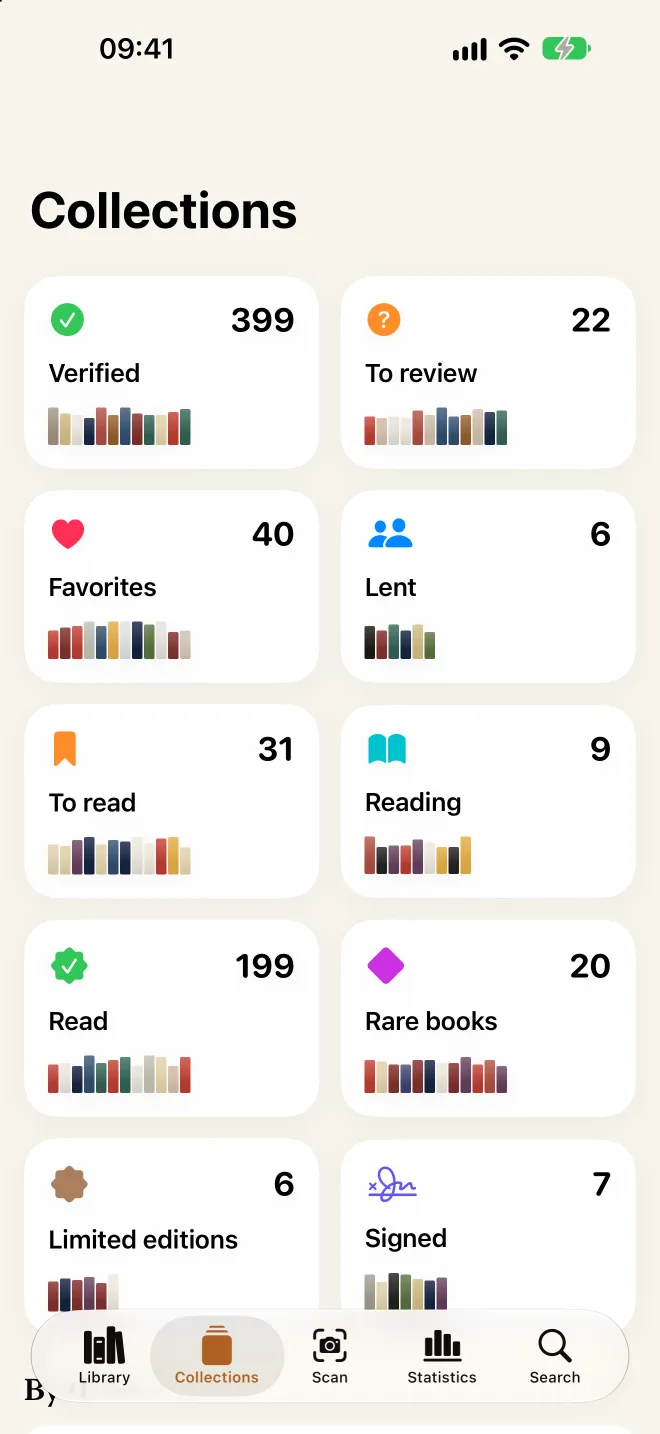
Smart collections
- Favorites
- To read
- Reading
- Read
- Lent
- Rare
- Signed
- Limited editions
- To review
Groups by theme. Apple Intelligence sorts your books by subject, on device, for searches like “books about geopolitics”.
- History
- Philosophy
- Crime & thrillers
- Science fiction & fantasy
- Poetry & drama
- Art & architecture
- Geopolitics
- Cooking
- Travel & geography
- Children & tales
Chapter V
Know your library
How many books, by which authors, from which publishers, in what languages? Who borrowed what, and since when? Biblioscope keeps count, no spreadsheet needed.
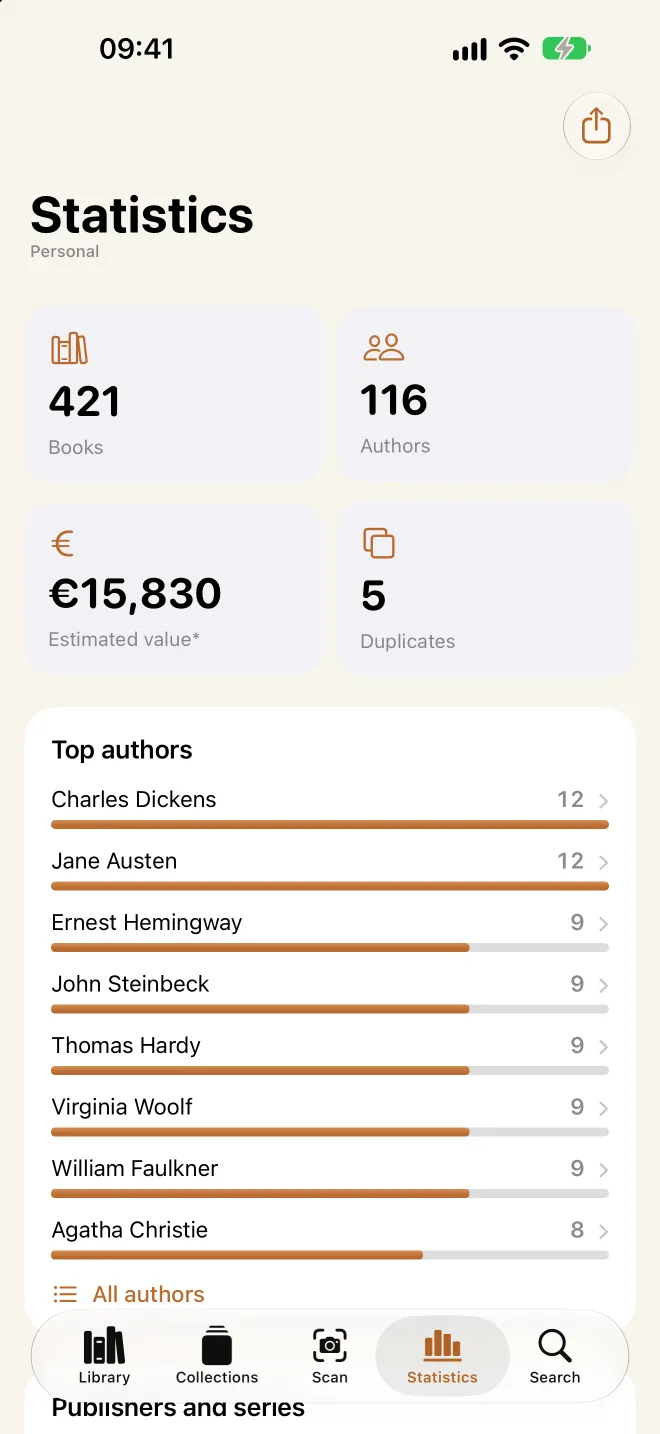
- 1,438books
- 612authors
- 9languages
- ≈ €11,200estimated value
On the tools shelf
-
Statistics
Authors, publishers, themes, languages, colors: clickable rankings that lead straight to the books.
-
Estimated value
A ballpark figure based on format and series, or the value you enter yourself.
-
Lending
Who has it, and since when: the “Lent” collection reminds you.
-
Duplicates & copies
Keep a single entry, or count your stock in copies: it depends on your profile.
-
Excerpts & summaries
Publisher’s description, first sentence, preview: in the language of the book you own, never in that of a translation.
-
Covers
Found automatically and kept on device. The “N without a cover · Find” banner fills in the missing ones.
-
Backups
A copy of your library is made on the device, automatically. Restoring takes one tap.
-
Near Me
Bookstores and libraries nearby, with directions, phone and website.
Chapter VI
For professionals
Heritage collections, resource centers, bookstore stock, a firm’s library: Biblioscope inventories thousands of books, profile by profile, and produces print-ready catalogs.
Museums
Collections and conservation libraries, inventoried room by room, case by case.
Institutional libraries
Resource centers, paper archives, technical documentation.
Foundations
Bequeathed collections, authors’ libraries, collectors’ gifts.
Bookstores and shops
Stock in quantities, section by section, and where each copy is: window, shelf or back room.
Shops
Museum shops, concept stores, guesthouses: the selection on display.
Law firms
Codes, journals and reference works, office by office.
Medical practices
Medical books and references, in the consulting room and the waiting room.
Companies
Team libraries and meeting rooms: quick inventory and counting.
Researchers
Your working library, references and exports for your tools.
One profile per collection or site
Each profile has its own books and locations: “Personal” and “Chambers”, or one profile per site. The whole app follows the active profile.
Inventories in the thousands
Libraries of several thousand books stay smooth, on iPhone as on iPad and Mac.
Quantities and stock
In a bookstore or a shop, each item has its quantity at every location and in total; in a library, identical books become a single “× N” entry. Rescanning a shelf recounts its stock.
Print-ready exports
A formatted PDF catalog, with statistics and books listed by location, and an Excel file. CSV, JSON and XML stay free.
Profiles
- PersonalPersonal804 books
- ChambersLaw firm2,316 books
- Rare booksLibrary5,120 books
- BookshopBookstore · stock3,487 copies
The whole app shows the checked profile; one tap to switch.
Chapter VII
Private by nature
Your library says a lot about you. It stays with you: Biblioscope was designed to work without an account, without a server and without collecting anything.
Analyzed on device
Photos are read on your iPhone or iPad and never leave it. No scan photo is kept, only a small thumbnail of each spine.
No account, no ads
No sign-up, no advertising, no tracking, no analytics. The publisher receives nothing from you.
Your private iCloud
Your library moves between devices through your iCloud, in your private space, which the publisher cannot access.
On-device backups
Automatic copies of your library are made on the device. Restoring adds what’s missing, without erasing anything.
This site doesn’t follow you either: no fonts, scripts or images loaded from elsewhere, no tracker, and a single cookie to remember your language. Read the privacy policy.
Chapter VIII
Free, no subscription
Biblioscope is free, with no ads and no subscription. Two options can be bought once, if you need them, and stay yours on all your devices.
-
The app
Biblioscope
Free
- Scanning, identification and locations
- Every view, search, collections and statistics
- iCloud sync and backups
- Up to 1,000 books, across all profiles
- CSV, JSON and XML exports
-
One-time purchase
Pro export
Once, for good
- Formatted PDF catalog: statistics, books by location, estimated value
- Complete Excel file
- For an inventory, an insurer or a collection
-
One-time purchase
Unlimited library
Once, for good
- Beyond 1,000 books, with no limit
- Across all your profiles
- For large libraries and professionals
Prices are shown in the App Store for your country. Purchases work on iPhone, iPad and Mac with the same Apple Account; “Restore Purchases” is in Settings. The demo library doesn’t count.
Appendix
Frequently asked questions
Do I need an account?
No. Biblioscope works without signing up. Your library is stored on your devices and in your private iCloud, with your usual Apple Account.
Are my photos sent anywhere?
Never. They’re analyzed on device. To identify a book, only the words read on the spine, or the ISBN, are sent to public catalogs.
Which books are recognized?
Printed books in English, French, Spanish, Japanese and many other languages, thanks to the Library of Congress, the BnF, the National Library of Spain, the National Diet Library and Open Library. Nearly 800 publishers and series are recognized on spines, and you can add your own.
What if a book is misidentified?
It stays “to review”. Pick another record, search the catalogs, scan the ISBN barcode or re-check the shelf with a new photo. Nothing changes without your approval.
Do I need an internet connection?
Spines are read on device; identification queries the online catalogs. Afterwards, your library and its covers stay available offline.
Which devices?
iPhone and iPad with iOS and iPadOS 26 or later, and Mac with macOS 26 or later. Apple Intelligence themes need a compatible device; everything else works without it.
How do I get my library on another device?
Install Biblioscope on your iPhone first, then on your iPad or Mac, with the same Apple Account and iCloud turned on: your library arrives on its own.
What happens beyond 1,000 books?
The free version holds up to 1,000 books across all profiles. Beyond that, the one-time “Unlimited library” purchase lifts the limit; otherwise you can add just the first books of a scan, from left to right.
Can I get my data out?
Yes, at any time: CSV, JSON and XML exports are free. The PDF catalog and the Excel file are part of “Pro export”.
Will old or worn books be read?
Often, yes: tilted, worn or upside-down spines are straightened. For an old binding with no readable title, search for the record or type it in by hand.
More questions? The user guide explains everything, step by step.
Epilogue
Biblioscope
Read · shelve · find
Your library deserves better than a spreadsheet. Photograph a shelf: the rest follows.
Download on theApp StoreFree · no subscription · no account